Subscribe & get the latest news in your email

By
Joachim Lohse
September 15, 2026
The charger reports Available. The driver plugs in. Nothing happens. Or the session runs for two hours and drops at 4% below target, while the dashboard shows the port online the entire time.
Every operator deals with this weekly. Almost nobody publishes the decision tree.
This guide is that tree. It splits EV charging session failures into three branches by the only thing visible at 6am in a yard — what the charger did — then gives the diagnostic signal for each: the OCPP status and error code you would expect, whether the evidence sits in the charger log or the backend log, and how to separate a vehicle-side fault from a charger-side fault from a network fault. The last section covers the operational layer: which failures self-heal, which need a remote reset, which need a truck roll, and how to route each one without burying your team in alerts.
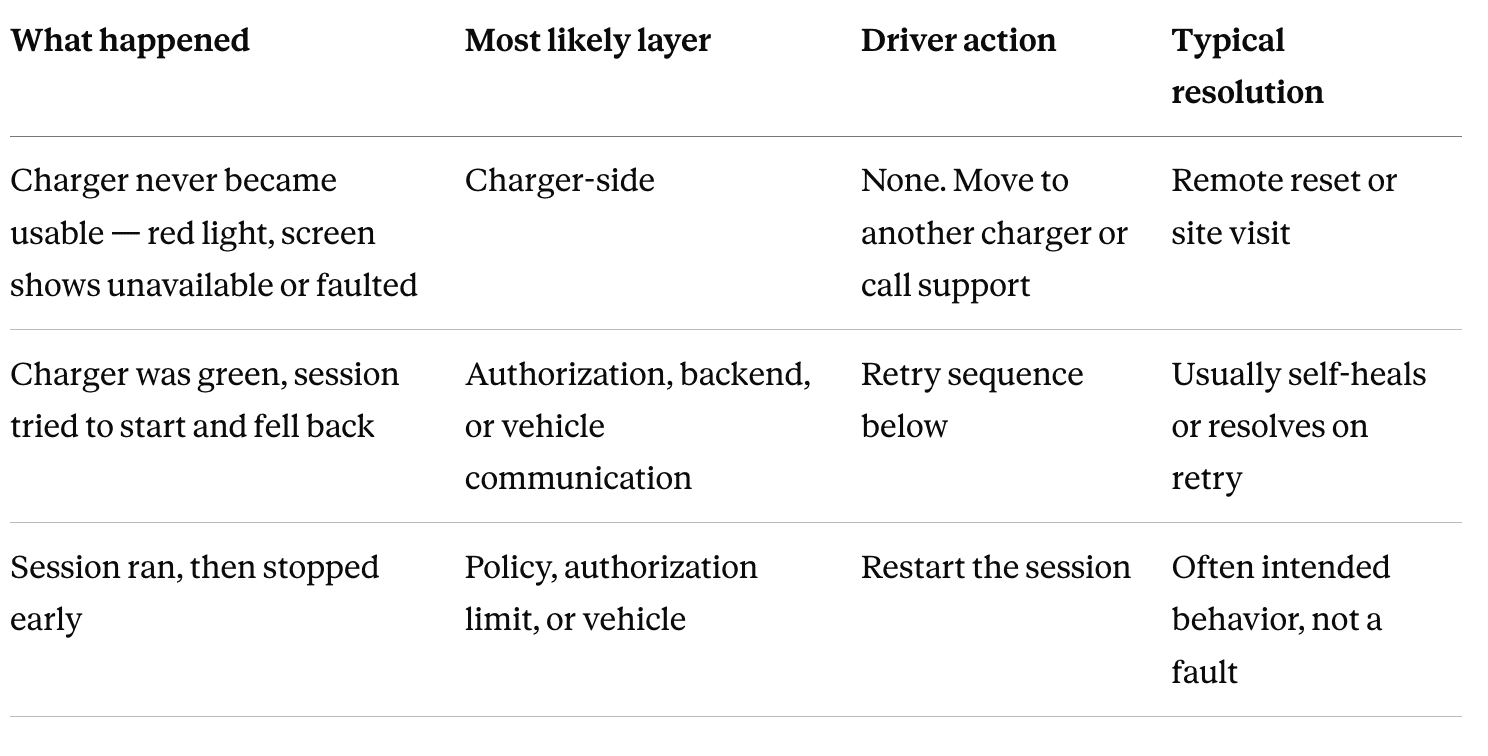
The order matters. Branch one means the charger was never going to work; nothing the driver does changes that. Branches two and three are worth a driver's time.
What it looks like. The status light is red. The screen reads unavailable, faulted, out of service, or equivalent. This is visible before anyone plugs anything in.
What the driver should do. Nothing. This is worth stating plainly because drivers lose time here. A charger in this state will not begin the authentication process at all — plugging in and swiping a card cannot produce a session, no matter how many times it is tried. If there is an alternative charger, use it. If this is the only option, call the site manager or support line and let them work it.
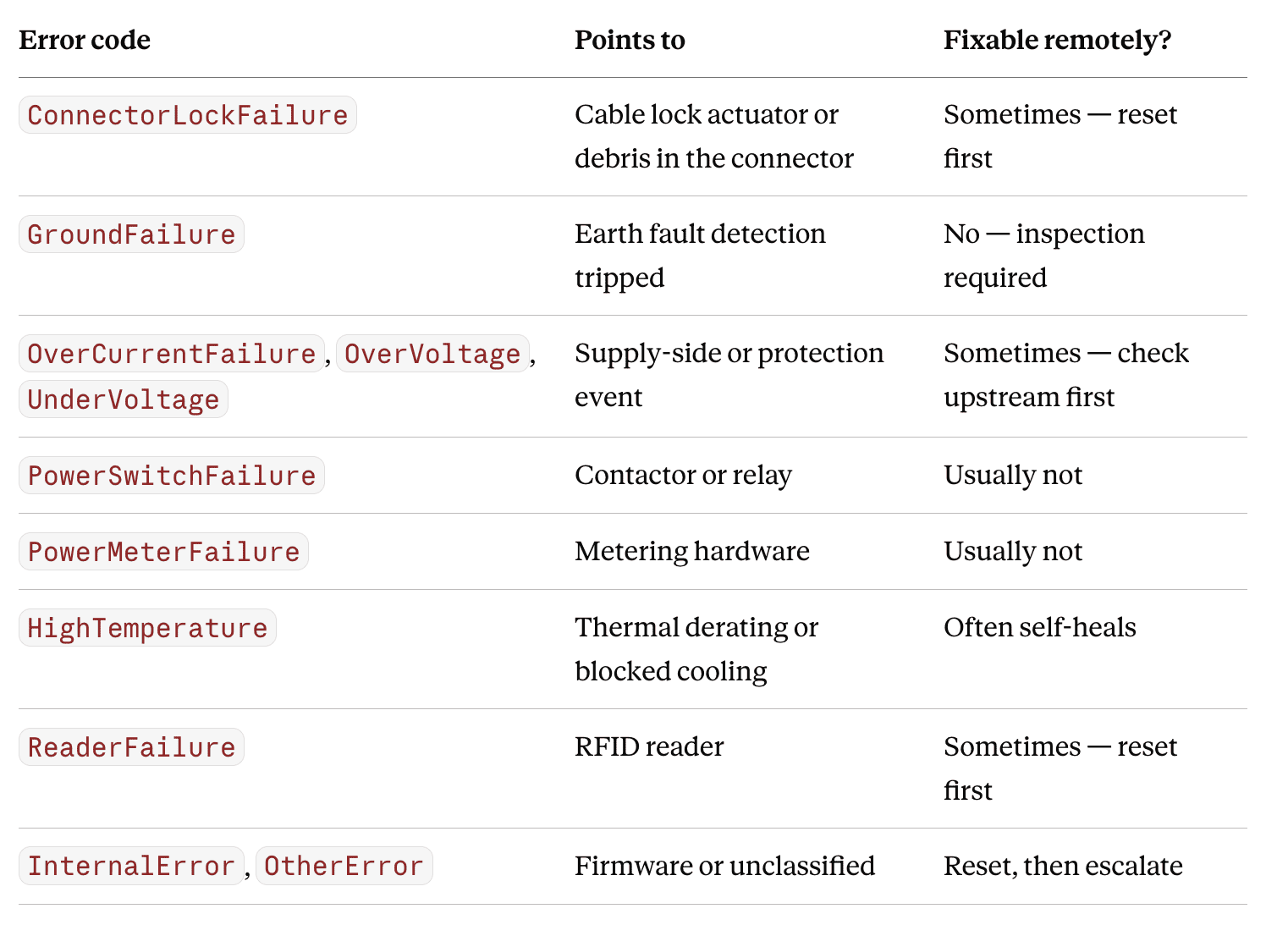
What it means underneath. In OCPP 1.6, this is a StatusNotification with status Faulted or Unavailable, and the accompanying errorCode is the diagnostic payload. Common ones and what they point to:
Three distinct causes produce this branch, and they are not equally likely:
ChangeAvailability to Inoperative in the backend, not a fault. It should never surprise your own team, but it regularly surprises drivers.What it is usually not: a connectivity problem. This is a common misdiagnosis. Chargers are designed to keep operating for a period without a backend connection, using cached authorization lists. A charger that has lost its network link will typically still charge; it will not typically go Faulted. If your sites experience real offline periods, that is a case for connectivity with redundancy and fallback and offline charging support — but do not reach for the network explanation when a red light is what you are looking at.
What it looks like. The charger is green. The driver plugs in and authenticates — mobile app, fuel card, or auto-authentication through the vehicle. The charger visibly does something: the screen changes, it appears to be preparing. Then it falls back to available, or into a fault state. Unplug the cable and it returns to green.
This is the most confusing branch for drivers, because everything looks like it should work.
Driver retry sequence — in this order:
What it means underneath. The charger moves Available → Preparing the moment a cable or card is presented. That transition is normal and is the charger doing its job. What happens next is where it breaks, and there are two different failure families that look identical from outside the vehicle.
Family A — authorization and backend. The charger sends an Authorize request (or the idTag inside StartTransaction) to the backend. The backend answers with an idTagInfo status:
Invalid — card or account unknown to this systemBlocked — known, but disabledExpired — validity window passedConcurrentTx — this token already has an open session somewhereAccepted — cleared to chargeAny non-Accepted answer ends the attempt, and the charger returns to Available. This is deterministic: it will fail the same way on every retry, which is the tell. The evidence lives in the backend log, not the charger. The charger only knows it was refused; the backend knows why.
There is a third possibility in this family: the backend never answered at all, because it timed out or was overloaded. Less common, but it produces the same visible behavior — and unlike a rejected card, a retry genuinely can succeed. This is the one case where "try it again" is real advice rather than a stalling tactic.
Family B — the charger cannot talk to the vehicle. Charger and vehicle exchange data over the control pilot in the cable: readiness, available current, error states. If the vehicle has been parked a while, its communication controller may have gone into sleep mode and never wakes to answer.
In OCPP 1.6 this surfaces as errorCode: EVCommunicationError, or as a session that reaches SuspendedEV and stays there — the charger is ready and offering power, and the vehicle is not taking it. That distinction is the single most useful signal in this whole guide: SuspendedEVSE means the charger or site is withholding power; SuspendedEV means the vehicle is. One is yours to fix, the other is the fleet's.
The off/on/off cycle in the retry sequence exists specifically to wake the vehicle's controller. It works often enough to be worth doing before anyone escalates.
How to tell the families apart quickly: if it fails identically every time with a clean return to Available, suspect authorization — check the backend. If the behavior varies between attempts, or the session hangs in a suspended state, suspect vehicle communication. Real-time OCPP alerts and charger and connector status give you this split without anyone reading raw logs in a yard.
What it looks like. The session initiated cleanly. The vehicle took real energy — several kWh, possibly for hours. Then it stopped, with the vehicle short of full.
Driver actions: start a new session. If that does not take, cycle the vehicle off and on and try again. If it still does not take, try another card or account.
What it means underneath. Because you had a working session, hardware failure is the least likely explanation. Lead with policy instead.
Most common cause: an intended SoC limit. Many depots and public sites cap sessions at a target state of charge. This is deliberate for two good reasons. First, most vehicles taper charging speed sharply above roughly 80% SoC, so the last fifth takes disproportionately long and blocks the connector for the next vehicle. Second, routinely charging to 100% every day measurably shortens pack life. If your fleet does this, make sure drivers know — an intended stop that nobody documented generates the same support call as a real fault.
Second cause: an authorization ceiling. On public sites, fuel cards and credit cards carry pre-authorization limits. When the session's running cost reaches that ceiling, many operators stop the session rather than carry the exposure. A new session resets the ceiling, which is why restarting works.
Third cause: something actually stopped it. OCPP StopTransaction carries a reason field, and it is the fastest way to close this out:
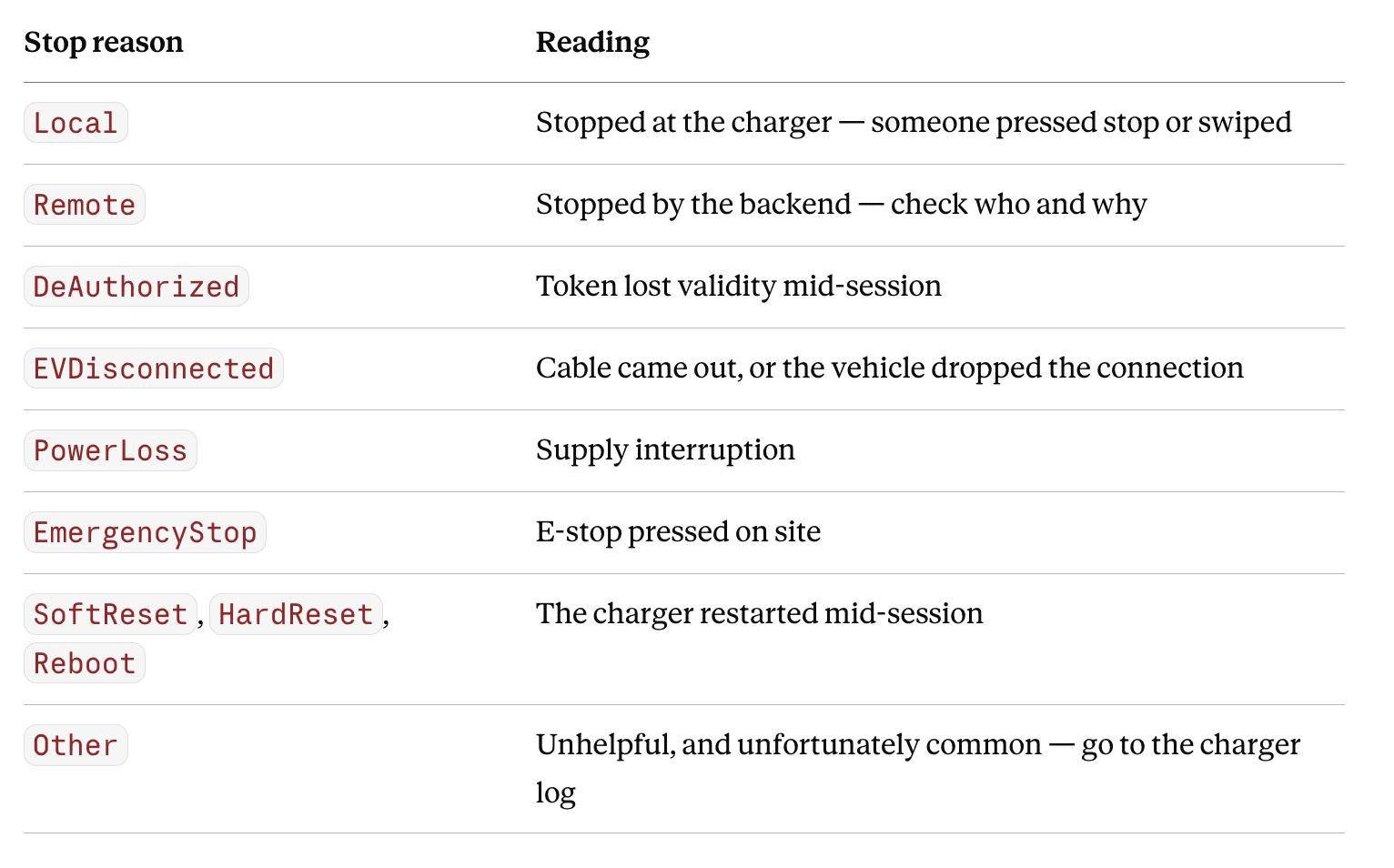
A Remote stop on a depot site is very often your own load management doing exactly what it was configured to do. Check that before you dispatch anyone.
The two logs answer different questions, and reaching for the wrong one wastes the first twenty minutes of any investigation.
InternalError or OtherError.The practical rule: if the failure was deterministic and clean, it is a backend question. If it was messy, intermittent, or physical, it is a charger question.
Getting at the charger log used to mean a site visit. It should not. Hardware diagnostics and charger logging and audit are what keep this a desk task, which matters because the difference between diagnosing remotely and diagnosing on site is a technician's day.

Diagnosis is half the work. The other half is routing — deciding which failures deserve human attention at all.
Self-healing — log it, do not alert on it. Thermal derating that clears. Single SuspendedEV events on vehicles that later charge fine. Momentary heartbeat gaps that recover inside the retry window. Alerting on these trains your team to ignore alerts, which is a worse outcome than missing them.
Remote reset — try automatically, alert only on failure. ConnectorLockFailure, ReaderFailure, and many InternalError cases clear with a soft reset. Attempt it, and only surface it to a person if the reset does not hold or the fault repeats. Remote charger control and automated firmware updates handle most of this class — recurring firmware-related faults in particular should be closed out with a version rollout, not with repeated resets.
Truck roll — alert immediately, with context. GroundFailure, PowerSwitchFailure, PowerMeterFailure, physical connector damage, and anything that survives two resets. A charger that is genuinely broken needs inspection or emergency repair, and that runs hours to days. The alert should arrive with the error code, the log excerpt, and the reset history already attached, so the person dispatched knows what they are walking into. Multi-channel notifications, the alert center, and team collaboration on alerts are what stop this from being a phone tree.
Not yours to fix — route it out. Vehicle-side faults belong to the fleet or OEM. Payment and roaming issues belong to the eMSP. Supply issues belong to the utility. The cost here is not the fix, it is the hour spent establishing that it was never your fault to begin with. Tier 1 help desk and Tier 2 support exist to absorb that triage before it reaches your engineers.
The underlying principle: every alert should correspond to an action a person can take. Anything else is noise, and noise is why real faults get missed. Pairing this with preventive maintenance for chargers moves a meaningful share of these failures out of the reactive queue entirely.
Why does my charger show Available but refuse to start a session?The charger is ready; something after that step is refusing. Most often it is an authorization rejection from the backend, a backend timeout, or the vehicle failing to communicate over the cable. Cycling the vehicle off and on and retrying within 20 seconds resolves the vehicle-side case.
Why did my charging session stop before the battery was full?Usually by design. Many depots and public sites cap sessions at a target state of charge to free the connector and protect battery life. The other common cause is a pre-authorization limit on a fuel or credit card. Starting a new session normally continues charging.
How can I tell whether the problem is the charger or the vehicle?Check which side suspended the session. In OCPP, SuspendedEVSE means the charger or site is withholding power; SuspendedEV means the vehicle is not accepting it. EVCommunicationError points to the cable data link with the vehicle.
Does a charger stop working when it loses internet?Generally no. Chargers operate for a period without backend connectivity using cached authorization. A red or faulted charger is far more likely to have a hardware or configuration cause than a network one.
Which charging failures need a site visit?Ground faults, contactor and meter failures, physical damage, and any fault that returns after two remote resets. Most other classes — lock failures, reader failures, thermal events, many internal errors — clear remotely.
Cut the truck rolls you do not need. Ampcontrol gives operators real-time OCPP alerts, remote diagnostics, and remote control across every charger brand — the foundation for monitoring and maintaining your chargers and for using OCPP for charging operations at scale. Book a demo to see it against your own sites.

Ampcontrol is a cloud-based software that seamlessly connects to charging networks, vehicles, fleet systems, and other software systems. No hardware needed, just a one-time integration.